It's 9:10 AM and the Lobby Is Already a Problem
A supplier is standing at the front desk, signing his name in a logbook that's already half full of illegible entries from the week before. Behind him, two job candidates are waiting for someone to notice them. The receptionist is on the phone, trying to figure out which "Rajesh" from three different companies has an appointment with the finance team today.
Nobody caught his badge. Nobody photographed him. If something went wrong in the building that afternoon, there's no reliable way to say who was actually on-site.
This scene repeats itself daily in offices, factories, hospitals, and campuses that still run visitor entry on paper or ad hoc spreadsheets. It's not a dramatic failure it's a slow, quiet one. And it's exactly the gap a visitor management system is built to close.
What Is a Visitor Management System?
A visitor management system is software that digitally handles every stage of a visitor's time on-site pre-registration, identity capture, host notification, badge issuance, and checkout replacing manual logbooks with a searchable, secure digital record. It gives facilities accurate, real-time visibility into exactly who is in the building at any moment.
That's the short version. The longer version matters more, because "who's in the building" is really three separate questions: who was supposed to be there, who actually checked in, and who is still there. Paper logs can't reliably answer any of them. A properly configured system answers all three automatically, and keeps the answers even after the visitor has left.
Why Manual Visitor Registers No Longer Work
Paper registers survived for decades because nothing better existed at the front desk. That's no longer true, and the gap between manual and digital has widened quickly.
The core problems with manual logs aren't cosmetic they're structural:
- Illegible or false entries. Handwriting is unreliable, and there's no verification step, so names, companies, and purposes are frequently wrong or fabricated.
- No real-time headcount. In an evacuation, a paper register tells you nothing about who is currently inside versus who checked in and left hours ago.
- Records that don't survive an audit. A regulator or client auditor asking "show me every visitor who accessed this floor in March" cannot be answered quickly, or sometimes at all, from a logbook.
- Zero visitor screening. There's no way to flag a banned individual, a blocklisted vendor, or a visitor who needs additional verification before they reach the door.
- Poor first impression. Long queues and manual entry are often the first thing a client, investor, or candidate experiences at your company.
Manual Register vs. Visitor Management System
Here's how the two approaches compare directly:
| Factor | Manual Register | Visitor Management System |
|---|---|---|
| Check-in speed | 3–5 minutes per visitor, longer during peak hours | Under 30 seconds via QR code or pre-registration |
| Security | No identity verification, easy to falsify | Photo capture, ID verification, watchlist screening |
| Compliance | Difficult to produce records on demand | Instant, exportable audit trail |
| Analytics | None | Visitor trends, peak-hour data, dwell time |
| Visitor experience | Queues, repetitive form-filling | Self-service, pre-filled, badge-ready |
| Scalability | Breaks down across multiple sites | Centralized across locations |
| Reporting | Manual, error-prone | Automated, real-time dashboards |
| Audit trail | Physical, easily lost or damaged | Digital, timestamped, tamper-resistant |
| Accessibility | On-site only | Cloud access from anywhere |
The Workplace Security Gaps Nobody Talks About
Most conversations about workplace security focus on badges and cameras. The visitor entry point gets far less attention, even though it's often the weakest link.
Tailgating is the most common failure: a legitimate badge holder opens a door and a second, unregistered person walks in behind them. Without a system that ties access to a verified, checked-in identity, tailgating is nearly impossible to detect after the fact.
Delayed host approvals create a different kind of risk. When a visitor is left waiting at the desk while someone tries to reach the host by phone, the natural pressure is to wave them through "just this once." That single exception, repeated often enough, becomes the norm.
Contractor and vendor management deserves its own mention. Contractors frequently need repeat, scheduled access and they're the group most often lost in manual systems, because a one-time paper entry doesn't capture the pattern of a returning vendor who should be flagged if their certification lapses or their contract ends.
Emergency response exposes the real cost of poor visitor records. During a fire drill or an actual incident, facility teams need an accurate, real-time list of everyone on-site not a logbook sitting on a desk that may or may not have been filled in correctly that morning.
What Digital Visitor Management Actually Delivers

The value of a visitor management system isn't abstract; it shows up differently for each team that touches the front desk.
For reception: Pre-registered visitors check in without needing staff intervention, freeing the receptionist to handle exceptions and genuine visitor needs instead of repetitive data entry.
For security teams: Real-time visitor logs, photo verification, and instant watchlist screening mean unauthorized access is caught at the door, not discovered after the fact.
For HR: Interview candidates and contractors have a smoother, more professional first experience and HR gets a clean digital record of every non-employee who was on-site for a given hire or incident.
For facility and compliance teams: Audit-ready visitor logs eliminate the scramble that happens when an ISO auditor or client security review asks for historical access records.
For management: Visitor analytics peak hours, average dwell time, visit purpose trends turn the front desk from a cost center into a source of operational data that informs staffing and space planning.
For visitors themselves: A five-minute wait becomes a thirty-second check-in, and that impression shapes how they perceive the organization before their meeting even starts.
How Different Industries Use Visitor Management Software
The same core system solves different problems depending on where it's deployed.
Corporate offices use it primarily for professionalism and host notification cutting the awkward gap between a visitor arriving and a host being alerted.
Manufacturing plants lean heavily on safety induction workflows, requiring visitors to acknowledge safety instructions digitally before they're granted access to the floor.
Hospitals need to track patient visitors separately from vendors and contractors, often with time-bound access tied to ward or department.
Schools and universities prioritize safeguarding verifying that anyone entering campus during school hours is either a pre-approved parent, an authorized vendor, or has a specific, logged reason to be there.
Government offices typically require stricter identity verification and longer record-retention periods, given the compliance standards those buildings operate under.
IT companies frequently deal with high volumes of interview candidates and client visitors, where NDAs and confidentiality agreements need to be signed digitally at check-in.
Co-working spaces manage the added complexity of multiple tenant companies sharing a single reception point, each needing separate visitor visibility.
Essential Features and Why Each One Matters
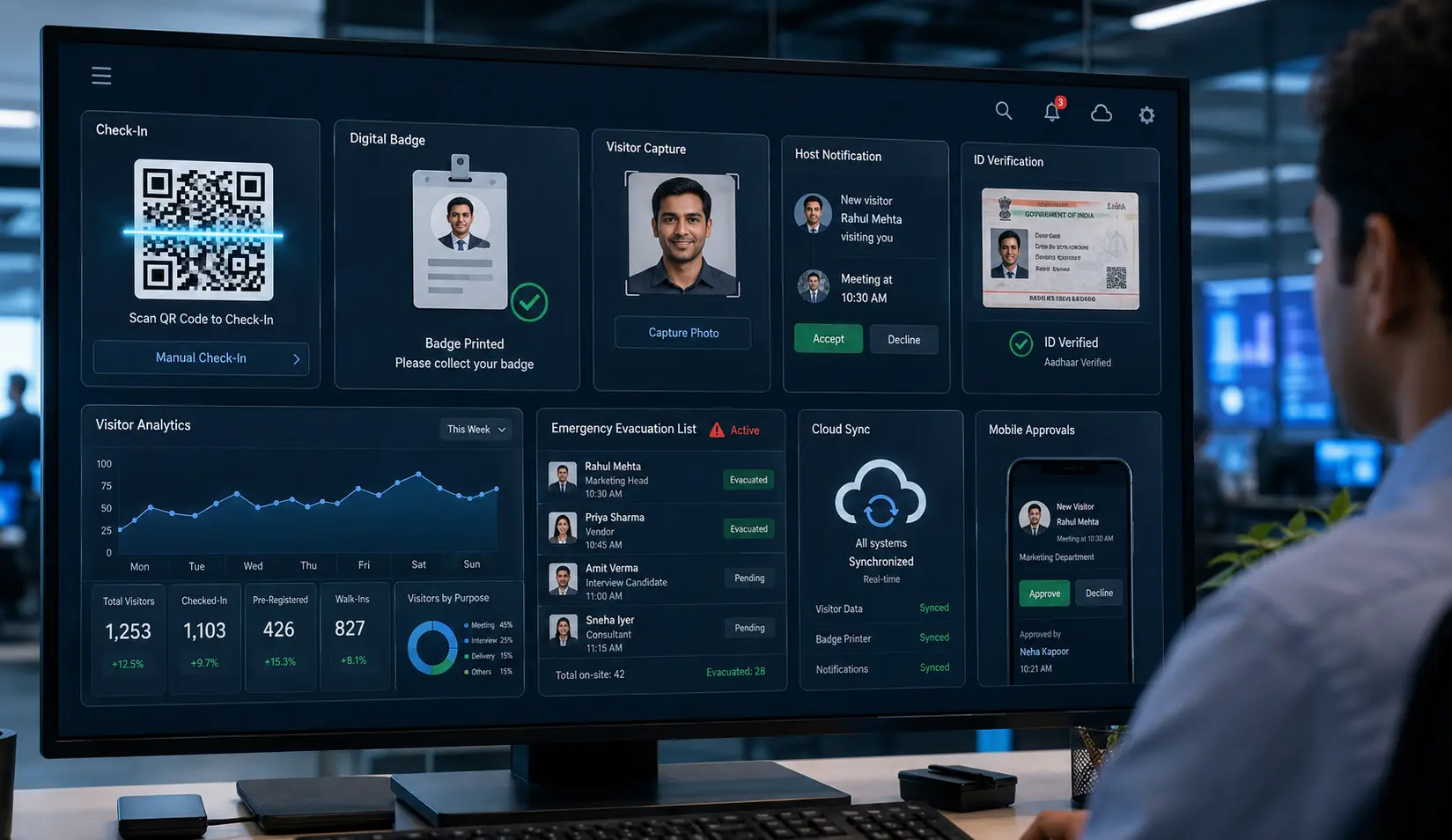
Not every feature matters equally to every organization, but each solves a specific, recurring problem.
- QR code visitor check-in removes queues entirely by letting visitors scan and confirm their own details in seconds.
- Pre-registration lets hosts invite visitors in advance, so the person arrives already expected and pre-verified.
- Badge printing gives security staff an instant visual cue for who belongs where, and for how long.
- Host notifications close the communication gap that causes visitors to sit unattended at reception.
- Visitor photo capture adds a verification layer that a signature never could.
- ID verification confirms the visitor is who they claim to be, which matters most in high-security or regulated environments.
- Digital visitor agreements (NDAs, safety declarations) replace paper forms and create a timestamped, legally usable record.
- Visitor analytics turn raw check-in data into patterns facility managers can actually act on.
- Multi-location support centralizes visitor data across branches instead of leaving each site with its own disconnected system.
- Emergency evacuation lists give facility teams a real-time, exportable list of who's on-site the moment it's needed most.
- Cloud-based management means access to visitor data isn't tied to a single on-site terminal.
- Mobile access lets hosts approve or track visitors from anywhere, not just their desk.
Security, Compliance, and Data Privacy
A visitor management system is, at its core, a compliance tool as much as a convenience tool. It builds a digital audit trail that records exactly when a visitor checked in, who they met, what they signed, and when they left data that becomes essential during a security review, an insurance claim, or a workplace incident investigation.
That said, collecting visitor data names, photos, ID numbers, contact details comes with its own responsibility. Organizations should confirm their chosen system stores this data securely, limits access to authorized staff, and follows applicable regional data protection requirements.
Frameworks like the OECD Privacy Guidelines and regional regulators (such as India's Digital Personal Data Protection Act or the EU's GDPR authorities) are useful reference points when evaluating a vendor's data-handling claims worth reviewing directly rather than relying on any vendor's summary of them.
Choosing the Right Visitor Management System: A Buyer's Checklist
Most organizations evaluate visitor management software on features alone. That's a mistake features are easy to demo and hard to differentiate on. The better evaluation criteria are operational.
Before committing, check for:
- Usability Can a first-time visitor complete check-in without staff help, on a device they've never used before?
- Scalability Does it work the same way at one location and at twenty?
- Integrations Does it connect with your existing access control, HR systems, or calendar tools?
- Reporting depth Can you actually export the specific report an auditor or regulator would ask for?
- Support responsiveness What happens when the check-in kiosk goes down five minutes before a board meeting?
- Pricing transparency Are you paying per location, per user, per visitor, or a flat rate and is that clear upfront?
- Implementation time Is this a same-week rollout or a multi-month IT project?
- Customization Can workflows differ between, say, a contractor and a client visit?
- Mobile compatibility Can hosts and security staff manage visitors from a phone, not just a desktop?
- Future readiness Does the roadmap include the features you'll likely need in two years, not just today?
A common deployment mistake worth naming directly: organizations often roll out a visitor system building-wide on day one, with every workflow turned on at once. It works better to pilot at a single reception point, refine the check-in flow based on real visitor behavior for a few weeks, and only then scale it across sites. The systems that get abandoned six months in are usually the ones that were configured once and never adjusted to how visitors actually behaved.
Why VizMan
Every challenge covered above slow check-ins, weak audit trails, missed host notifications, inconsistent contractor tracking is the exact problem VizMan's visitor management platform was built to solve.
VizMan replaces the front-desk logbook with QR code check-in, instant host notifications, visitor photo capture, and digital badge printing, so reception staff spend less time on data entry and more time on visitors who actually need help. For security and facility teams, it maintains a searchable, exportable audit trail and supports emergency evacuation reporting, so "who's in the building right now" is always a real-time answer, not a guess.
Across industries corporate offices, manufacturing plants, hospitals, and educational campuses VizMan's visitor management system adapts to different check-in and compliance workflows without forcing every organization into the same rigid process. For sites also managing high foot traffic at service counters or help desks, VizMan's queue management system extends the same digital-first approach beyond the front door.
Key Takeaways

- Manual visitor registers create real security, compliance, and experience gaps that digital systems are specifically designed to close.
- A visitor management system answers three distinct questions in real time: who's expected, who's checked in, and who's currently on-site.
- Tailgating, delayed approvals, and inconsistent contractor tracking are underdiscussed but common security failures at the front desk.
- The right system delivers measurable value across reception, security, HR, facilities, and management not just at the front desk.
- Evaluation should focus on operational fit usability, scalability, integrations, and support not just feature checklists.
- Piloting at one location before a full rollout consistently produces better long-term adoption than an all-at-once deployment.
- Data privacy and secure handling of visitor information should be a non-negotiable part of any vendor evaluation.
Conclusion
The lobby is often the first and most overlooked part of a company's security and compliance posture. A visitor register that looked adequate a decade ago now leaves real gaps in accuracy, in audit readiness, in emergency response, and in the impression a visitor forms in their first sixty seconds on-site.
None of this requires a complicated overhaul. It requires replacing a manual process with a digital one that verifies identity, notifies hosts instantly, keeps a real audit trail, and gives facility and security teams an accurate, real-time picture of who is actually in the building. The organizations getting this right aren't necessarily the largest ones they're the ones that treated visitor management as an operational and security priority rather than a reception-desk convenience.
If your front desk still runs on a logbook, it's worth walking through what a digital check-in would look like for your specific space the visitor volume, the compliance requirements, the number of locations involved. VizMan's team can walk you through exactly that, based on how your building actually operates, not a generic demo script.