Picture a busy reception desk. A visitor walks in while the receptionist is on a call. The host has no idea anyone is waiting, and a paper register sits on the desk with a pen that may or may not work.
QR-based self-service check-in helps reduce this waiting time. A QR code check-in system lets visitors register themselves on their own phones, so reception does not have to type in every detail. It works best as part of a visitor management system. This guide explains what both terms mean, how check-in works step by step, which features matter, and how to choose the right solution.
What Is a Visitor Management System?
Definition: Visitor management system
A visitor management system helps businesses manage visitors from arrival to departure. It records who arrives, informs the host, handles approval and passes, and keeps a digital record of visitor activity.
You may also see it called visitor management software or a digital visitor management system. Its goal is to replace paper registers and manual phone calls with one connected process. QR-based self-service check-in is one part of that process.
What Is QR-Based Self-Service Check-In?
Definition: QR-based self-service check-in
A method where visitors register themselves by scanning an organization's QR code with their phone. A digital form opens, they enter their details, and the system records the visit.
In a visitor management system, this is the front door. The visitor does the first step. The system then handles verification, host notification, approval, passes and records.
Why Businesses Are Moving Away from Paper Visitor Registers
Paper registers depend on reception staff and manual entry. Records sit on physical pages, so finding an old visit takes effort. Hosts are often told by phone call, which adds delay.
A digital visitor registration system replaces these steps with one flow. Records are stored in one place and can be searched later.
The Rise of Contactless and Self-Service Visitor Registration
More organizations now prefer contactless check-in and self-service check-in. Visitors use their own phones, so there is no shared pen to pass around. Staff also spend less time on data entry. Many teams search for contactless check-in software for this reason.
How QR Check-In Fits into a Modern Visitor Management System
Think of the visitor management software as the full visit, and QR check-in as its first step. After the scan, the same system can notify the host, approve the visit, issue a pass and record activity.
This is what automated visitor management looks like in daily use. It also works as reception management software, because reception can see every visit in one place.
Why Faster Visitor Processing Matters
Reception is the first place a visitor sees. A long queue gives a weak first impression and keeps staff away from other tasks. It makes registration faster and simpler, lowers reception workload and gives you better records.
How QR Code Check-In Works: Step by Step
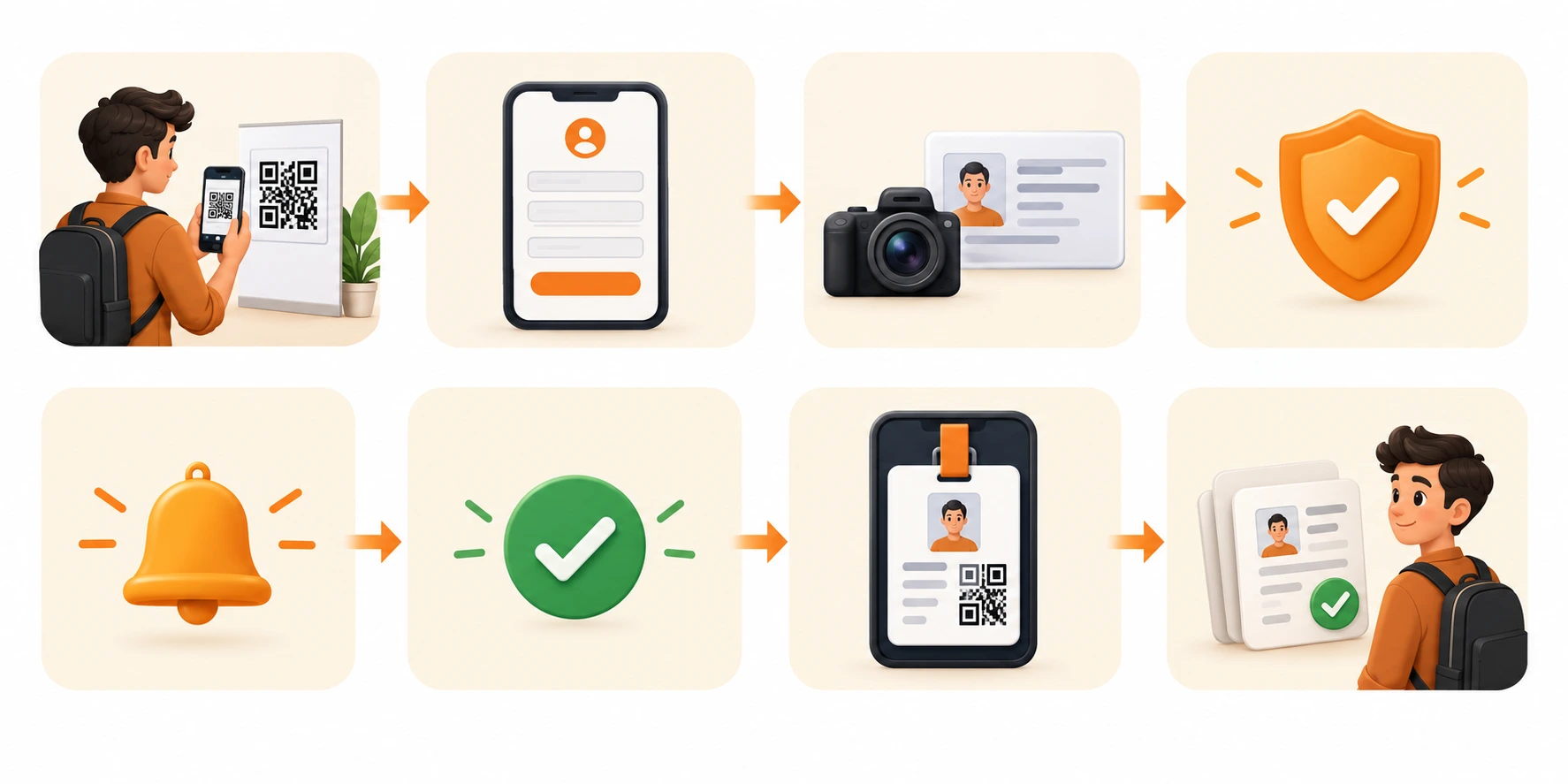
Quick Answer: The visitor scans the QR code and fills in a digital form. The details go for verification, the host is notified, and after approval the visitor gets a pass. The visit is recorded digitally.
Here is how QR code check-in works in practice. This is the typical QR code visitor check-in process:
- Scan the QR code. The visitor scans the organization's code with a phone camera or QR code scanner. This lets the visitor start without waiting for the receptionist.
- Open the form. A digital registration form opens. Details go straight into the system instead of onto paper.
- Enter details. The visitor adds the required information. This is the online visitor registration process. Typed entries are easier to read than handwriting.
- Capture photo or ID proof. The system asks for this where the site requires it. It helps confirm who is visiting.
- Submit for verification. The details are submitted and checked. OTP (one time password) verification can be part of this step.
- Notify the host. The relevant person receives a message through the visitor notification system, so nobody has to call them.
- Approve and issue a pass. Once the visit is approved, the visitor receives a digital pass, also called an ePass.
- Record the visit. Check-in and Visitor arrivals and departures are saved digitally, so records stay in one place.
Visitors can also register before they arrive with a visitor pre-registration system. This can shorten the steps at the door.
Key Features of a QR Code Visitor Management System
Use this list to compare visitor management software features:
| Feature | What it does |
|---|---|
| QR-based self check-in | Visitors register by scanning the code |
| Mobile friendly registration | The form works on a phone screen |
| Photo and ID proof capture | Records who the visitor is, where required |
| OTP verification | Uses a one time password to verify the visitor |
| Visitor pre-registration | Lets visitors register before they arrive |
| Host notifications | Tells the host about the visitor |
| Visitor approval workflows | Records approval before a pass is issued |
| Digital visitor passes (ePasses) | Gives the visitor a digital pass |
| Real-time visitor logs | Shows check-ins and activity as they happen |
| Visitor analytics and reports | Shows visitor activity over time |
| Blacklist and VIP visitor management | Flags blocked visitors and important guests |
| Multiple user roles | Separate access for admin, security, reception and hosts |
Roles matter more than they look. When admin, security, reception and hosts have their own roles, each person sees what their job needs. Real time logs also work as a visitor tracking system, because teams can see who is on site.
Benefits of QR-Based Self-Service Check-In
The biggest benefit is faster visitor check-in. Visitors register on their own, so lines get shorter and reception has less to do. The other benefits follow from that.
- Speed and workload: faster visitor registration, shorter waiting times, less manual data entry and a lighter reception workload.
- Accuracy and records: more accurate visitor information, All visitor records stored in one place and better visibility of visitor activity.
- Experience and order: a better visitor experience and a more organized reception.
Accuracy improves because visitors type their own details. Managers can also review activity from one place instead of flipping through pages.
Pros and Cons of a QR Code Check-In System
Pros
- Faster, visitor led registration
- Searchable digital records
- Automatic host notifications
- Less paper and manual entry
Cons
- Visitors need a smartphone or another way to register
- Forms, approvals and notifications need to be set up for each site
However, businesses should consider a few practical limitations before choosing a system. They do not describe any one product.
Visitor Management System for Different Industries
Any site with regular visitors can use QR check-in. Common examples:
- Corporate offices: a visitor management system for corporate offices handles day to day guests.
- Educational institutions: a visitor management system for schools records who enters the campus.
- Healthcare facilities: a visitor management system for hospitals manages visitors in a care setting.
- Manufacturing and factories: a visitor management system for factories records people entering industrial sites.
- Government organizations: a government building visitor registration system keeps organized visitor records.
- Residential communities: a visitor management system for residential societies helps manage guests.
- Warehouses and logistics: a visitor management system for warehouses records arrivals at busy sites.
- Events and business premises: an event visitor management system helps with larger crowds.
QR-Based Check-In vs. Traditional Visitor Registers
The digital visitor register vs paper logbook question comes down to these differences:
| Area | Paper register | QR-based check-in |
|---|---|---|
| Registration | Paper | Digital |
| Data entry | Manual | Self-service |
| Process | Depends on reception | Led by the visitor |
| Host alert | Manual call | Automated notification |
| Records | Physical | Centralized digital |
| Retrieval | Difficult | Searchable history |
| Security | Basic registration | Integrated security workflow |
Why Replace Paper Visitor Logbooks?
Paper is slow to search, relies on manual entry and does little to check identity. Visitor log book software keeps the idea of a log but makes it searchable. A paperless visitor management system goes further and stores everything digitally. You may also hear it called an electronic visitor management system.
Is QR Code Visitor Check-In Secure?
It can be, when the system adds checks beyond the scan. The QR code only opens the form. Security comes from what happens next. A secure visitor registration system should include:
- Identity verification: photo and ID proof capture, where required
- OTP verification: a one time password to verify the visitor
- Host approval: the visit is approved before entry
- Authorized access: only approved visitors are allowed in
- Visitor pass or ePass: every visitor carries a pass
- Blacklist management: blocked visitors are flagged
- Secure visitor records: encrypted visitor data
- Data access controls: only the right roles can view records
- Retention and privacy: clear rules on how long data is kept
Before you choose a system, ask how it handles visitor data protection and privacy. Find out who can see records and how long they are kept. Privacy rules differ by place, so check the ones that apply to you.
How to Select a Visitor Management System
Start with your daily needs, then check each option against this list.
Visitor Management System Selection Checklist
- ☐ Easy QR scanning
- ☐ Simple visitor registration
- ☐ Pre-registration option
- ☐ ID and identity verification
- ☐ Host notification
- ☐ Approval workflows
- ☐ Visitor pass generation
- ☐ Real-time visitor logs
- ☐ Reporting and analytics
- ☐ Integration with existing security systems
- ☐ Multiple user roles
- ☐ Scalability across locations
- ☐ Data security and privacy
Common Mistakes to Avoid
- Choosing only on price. A low cost tool may lack verification, approvals or reports. Compare every option against the checklist.
- Skipping ID and OTP checks. Fast check-in without verification weakens security.
- Ignoring multiple locations. If you grow, the system should scale across sites.
- Forgetting the host. Without notifications and approvals, reception still makes the calls.
- Not asking about privacy. Ask how records are stored and who can see them.
Before you decide, make a visitor management system demo request and test the system with your reception and security staff.
The Role of QR Check-In in Modern Visitor Management
Scanning the QR code is just the beginning of the visitor check-in process. A modern visitor management system covers the full The complete visitor journey, from pre-registration to exit.
- Reception and security work together. Both teams see the same visitor data.
- Check-in links to verification. ID and OTP checks sit in the same flow.
- Hosts are informed. They are notified as soon as the visitor submits details.
- Passes support access. Digital passes and approvals control who gets in.
- Visibility is live. Teams see visitor activity as it happens.
- Reports are ready. Analytics show visitor activity over time.
Together, this gives you a more automated reception process.
Conclusion
QR check-in is a practical alternative to manual visitor registers. It makes registration faster and simpler, lowers reception workload and gives you better records. It also adds verification and security to the process.
QR self-service works best as part of a complete visitor management system. Choose one that covers registration, verification, host alerts, passes and reports, and test it before you commit.
Key Takeaways
- A visitor management system manages the whole visit. QR-based self-service check-in is its first step.
- The flow runs from scan to form, verification, host notification, approval, pass and digital record.
- Key features include OTP, ID capture, pre-registration, ePasses, logs, analytics and user roles.
- It cuts waiting time and reception workload.
- Security depends on identity checks, host approval, access controls and clear privacy rules.