Picture a corporate conference with a few hundred attendees. Invitations have gone out over email and WhatsApp. RSVPs are trickling into a spreadsheet that someone updates by hand. On the day itself, guests start arriving all at once, the reception desk is trying to match names against a printed list, security wants to know who's authorized to be on which floor, speakers are asking where their session room is, and the organizer keeps getting pulled aside to answer "how many people have checked in so far?"
.
None of this is really about picking a venue or designing an invite. It's operations people, timing, information and access, all moving at once. That's what event management actually is, and it's also why so many organizers eventually look for a dedicated Event Management System to hold the process together instead of running it across five different tools and a shared spreadsheet.
.
This guide walks through what event management involves, why manual methods break down as events grow, and what a modern Event Management System actually does including where VizMan's approach fits into that picture.
.
What Is Event Management?
.
Event management is the process of planning, organizing, executing, monitoring and evaluating an event from the first invitation to the post-event report. It's broader than event planning, which usually refers to the upfront design work theme, venue, vendors, agenda. Management is what keeps all of that running once real people start registering, arriving and interacting with the event.
.
In practice, event management covers:
.
- Attendee registration and invitations
- Scheduling and agenda coordination
- Venue and staff coordination
- Check-in and access control
- Attendance tracking during the event
- Communication before, during and after
- Feedback collection and reporting
This applies across a wide range of formats corporate conferences, seminars, workshops, trade shows, exhibitions, internal company meetings, networking events, training programs, and institutional or campus events. A 40-person workshop and a 4,000-person trade show both need the same underlying pieces; they just need very different amounts of coordination to pull them off.
.
Why Traditional Event Management Becomes Difficult
.
Most organizers don't start out looking for software. They start with a spreadsheet, an email inbox, and a printed guest list, and that works fine for a small internal meeting. The trouble shows up as the event gets bigger or more complex.
.
A few patterns show up again and again:
.
- Manual attendee lists get out of sync the moment someone registers late or cancels, and two team members end up working off different versions.
- Spreadsheet-based registration means someone is re-typing the same attendee details into badges, entry logs and reports.
- Long check-in queues form when every guest has to be manually located on a printed list and verified by hand.
- Physical passes and paper records are easy to lose, hard to reissue, and impossible to search later.
- No real-time visibility organizers often don't know how many people have actually arrived until someone manually counts.
- Fragmented communication between the reception desk, security, and the events team means each group is working from partial information.
- Manual reporting after the event means pulling numbers from several sources and reconciling them by hand.
None of these problems are dramatic on their own. But they compound. An event with 50 attendees can absorb a certain amount of manual work without anyone noticing. An event with 2,000 attendees across multiple entry points and several sessions cannot the same manual process simply takes more people, more hours, and produces more errors along the way.
.
What Is an Event Management System?
.
An Event Management System is a centralized digital platform that helps organizers manage the stages of an event from invitations and registration through check-in, attendance tracking and post-event reporting in one connected workflow instead of several disconnected tools.
.
Rather than treating invitations, registration, entry and reporting as separate tasks handled in separate places, the system links them together:
.
Invitation → Registration → Verification → Digital Pass → Check-In → Attendance → Monitoring → Feedback → Analytics
.
It's worth being clear about what this software is not. An Event Management System doesn't replace event strategy, venue selection, or the judgment calls organizers make about format and content. What it does is give the team executing that strategy a shared, accurate, real-time picture of who's registered, who's arrived, and how the event is actually going instead of everyone working from their own version of the truth.
.
Key Features of an Event Management System
Bulk Invitations and Attendee Uploads
For anything beyond a handful of guests, sending invitations one at a time isn't realistic. Bulk invitation tools let organizers upload a CSV file of attendee details and send invitations to the entire list in one action, which matters most for large corporate events, conferences and multi-department gatherings where the guest list is assembled from several sources.
Custom Registration Forms
A product launch, an internal training session and a trade show each need different information from attendees job title and company for one, dietary requirements for another, department and manager approval for a third. Customizable registration fields let organizers collect exactly what they need for that specific event, rather than forcing every event through a generic sign-up form.
QR Code Check-In
QR-based check-in replaces the process of manually searching a printed list for each guest's name. An attendee's registration is converted into a QR code, which staff scan on arrival to confirm identity and log entry. This can meaningfully reduce queue times and manual verification errors, particularly at events with a single entry window when most guests arrive within the same 30–60 minutes.
OTP Verification
One-time password (OTP verification) adds a second identity check alongside the QR pass, typically sent to the attendee's registered phone number or email. This can strengthen identity verification at events where confirming that the right person is holding the pass matters without claiming it eliminates every possible case of misuse.
Digital Event Passes
Digital passes reduce dependence on printed badges that need to be produced, transported and reissued if lost. With customizable pass templates, organizers can generate attendee and gate passes that reflect the event's branding and include the access level relevant to that guest general attendee, speaker, vendor or staff.
Agenda and Schedule Management
Larger events usually run multiple sessions, speakers, rooms and time slots in parallel. Agenda management tools let organizers build and share the event schedule so both staff and attendees know where they need to be and when, which reduces the amount of on-the-day questions directed at the reception desk.
Real-Time Attendance Tracking
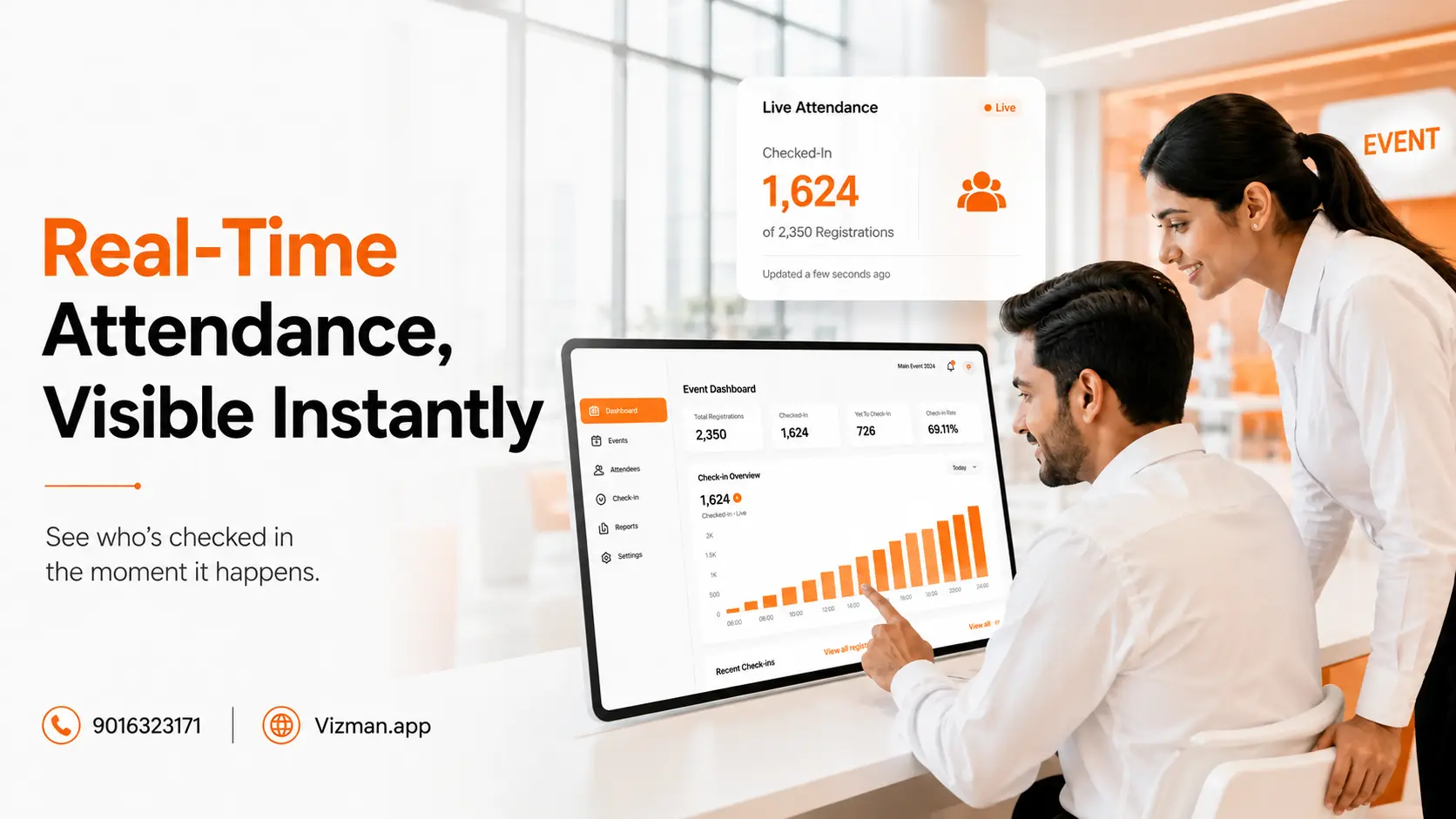
Knowing how many people are actually on-site not how many registered matters for decisions made during the event itself: whether to open a second entry line, whether a session room needs more chairs, or when to start a session because enough attendees have arrived. A live view of check-ins as they happen gives organizers that information without waiting for someone to do a manual headcount.
Gate Pass and Access Management
For events with multiple entry points, or where deliveries and vendor access need to be tracked alongside attendee entry, gate pass records help keep an organized log of who came through which entrance and when useful for both security review and post-event reporting.
Role-Based Event Management
Different people on an event team need different tools. A practical model looks like this:
.
- Administrator creates the event, sets up pass templates and approval rules, manages users, and exports reports.
- Employee/Host sends invites, reviews RSVPs, and gets notified when their guests arrive.
- Receptionist handles on-site registration, walk-ins and attendee queries.
- Gatekeeper scans QR codes, checks OTPs, and manages physical entry at the gate.
Giving each role access to only the screens relevant to their job keeps the interface simple for each person and reduces the chance of someone accidentally editing data outside their responsibility.
Event Feedback and Analytics
Post-event surveys and attendance analytics turn a one-off event into a source of information for the next one which sessions had the strongest attendance, where check-in bottlenecks occurred, and what attendees actually thought of the experience. Without this step, that knowledge tends to live only in the memory of whoever ran the event.
.
How an Event Management System Improves the Attendee Experience
.
From the attendee's side, the journey usually looks like this: Invitation → Registration → Confirmation → Digital Pass → Arrival → Verification → Check-In → Event Participation → Feedback.
.
A digital system smooths several friction points along that path a shorter, clearer registration form instead of a generic one; a digital pass that doesn't need to be printed and carried; a faster line at the door because verification is a scan instead of a manual name search; and clearer information about the agenda once they're inside. None of this guarantees a flawless event venues, weather and speaker delays are outside any software's control but it does remove a meaningful amount of the friction attendees typically associate with registration and entry.
.
How an Event Management System Improves Event Security
.
Security at an event is really about access management: making sure the right people are in the right places, and having a record of who entered when. A digital system supports this through QR verification, OTP checks, defined access rules per pass type, digital passes tied to a specific attendee, gate entry records, and role-based access so only authorized staff can view or edit sensitive attendee data.
.
It's worth being direct here: no system makes an event "100% secure." What these tools do is add visibility to attendee entry, help reduce reliance on manual verification, and give organizers a searchable record if something needs to be reviewed after the fact not a guarantee against every possible security scenario.
.
Event Management for Large-Scale Events
.
Scale changes what event management requires. A workshop for 30 people can run on a printed list and a friendly face at the door. An event with thousands of attendees, multiple entry points, parallel sessions and a large staff team cannot the coordination problem grows faster than the guest count does.
.
This is where a centralized system earns its place: one dashboard showing check-ins across every entry point, one set of registration data instead of several conflicting spreadsheets, and role-based access so reception, security and hosts are all looking at the same information in real time. VizMan describes its platform as built to scale from small meetings and workshops up to large conferences and multi-location events, without publishing a specific capacity limit the practical benefit is centralization, not a guaranteed attendee number.
.
Who Can Benefit From an Event Management System?
.
Corporate event teams running conferences, employee events and business gatherings get a single system for invitations through reporting. Event managers coordinating registration and on-site logistics get real-time visibility instead of end-of-day summaries. Reception and front desk teams handling registration, walk-ins and attendee questions get a faster, more organized check-in process. Security teams get entry verification and access records. HR and administration teams running internal or employee-facing events get the same registration and tracking tools without needing a separate consumer event platform. Educational institutions running seminars and workshops, and trade show or exhibition organizers handling high-volume registration, both benefit from the same core workflow applied to their format.
.
Event Management System vs Manual Event Management
.
| Area | Manual Process | Event Management System |
|---|---|---|
| Registration | Spreadsheets and paper forms | Digital registration forms |
| Invitations | Manual or batch communication | Bulk invitations |
| Check-In | Manual name verification | QR-based check-in |
| Passes | Physical, printed | Digital passes |
| Attendance | Manual counting | Real-time visibility |
| Access | Paper-based records | Digital access records |
| Reporting | Manual compilation | Automated reporting |
| Feedback | Separate surveys | Integrated feedback |
| Scalability | Increasing admin workload | Centralized digital workflow |
.
How to Choose the Right Event Management System
.
Rather than starting with a vendor comparison, it helps to start with a checklist of what your events actually need:
.
- Does it support the registration volume and form complexity you need?
- Can you customize registration fields per event?
- Does it handle bulk invitations and CSV uploads for large lists?
- Is QR check-in available, and does it work offline if venue connectivity is unreliable?
- What identity verification options exist beyond a simple scan?
- Can passes be branded and customized per attendee type?
- Is attendance tracked in real time, or only after the event?
- Does it support role-based access for different team members?
- What reporting and analytics does it provide after the event?
- Is it accessible on both mobile and web for on-site teams?
- Will it scale from your smallest event to your largest without switching systems?
- How is attendee data stored, and what privacy practices are in place?
- What does support look like during a live event, not just during setup?
Running through this list against two or three vendors will tell you more than any single feature comparison.
.
How VizMan Approaches Event Management
.
VizMan's Event Management solution brings invitations, registration, digital passes, check-in, agenda coordination and reporting into one platform rather than a separate tool for each step.
.
In practice, that means an organizer can upload a CSV of attendees and send bulk invitations in one action instead of sending them individually. A custom registration form can be built for each event to capture exactly the fields that event needs. Once registered, attendees receive a digital pass generated from a branded template, which the gate team scans as a QR code on arrival with OTP verification available as an added identity check. Agenda management lets organizers publish session schedules that both staff and attendees can reference, and on-site coordination tools support staff check-ins alongside attendee ones. Courier and gate pass logs keep delivery and access records organized separately from attendee entry. Throughout the event, a live dashboard shows attendance in real time, and after it ends, a feedback survey and reporting tools capture what worked and what didn't. Role-based modules give administrators, hosts, receptionists and gatekeepers each their own relevant screen, so a receptionist handling walk-ins isn't navigating the same interface an administrator uses to build pass templates.
.
This isn't a replacement for the planning and judgment an event still requires it's the operational layer that helps a team execute that plan without losing track of who's registered, who's arrived, and what happened.
.
The Future of Event Management Is More Digital
.
The direction event management is moving in is already visible in what organizers are adopting: digital registration instead of paper forms, contactless check-in instead of manual verification, real-time attendance visibility instead of end-of-day counts, and automated reminders instead of manual follow-up emails. None of this requires speculation about future technology it's a shift toward tools that are already in use, applied more consistently across more events, with the data from each event feeding into how the next one is planned.
.
Conclusion From Event Planning to Event Intelligence
.
A successful event needs more than a good agenda and a booked venue. It needs organization, clear communication, a smooth attendee experience, sensible access control, real-time visibility into what's happening, and data that actually gets used afterward. An Event Management System doesn't create any of these on its own but it connects them into one workflow instead of leaving them scattered across spreadsheets, printed lists and separate inboxes.
.
If your organization is still managing event registrations, attendee check-ins and access through disconnected manual processes, it may be time to explore a centralized Event Management System. You can look through VizMan's Event Management solution or request a demo to see how the workflow fits your next event and if your team also handles day-to-day office visitors or scheduled meetings, VizMan's Visitor Management System and Meeting Management tools cover those adjacent needs, while the Queue Management System addresses walk-in queues specifically.